To search
Softonic Rating:
Good:7/10
License:
Free
Added:
November 5, 2007
Updated:
June 18, 2008
Publisher:
Website
File size:
7.3 MB
Downloads:
204
Elena Santos

“Adjust RAW photos before saving them as JPG”

by Elena Santos

Working with RAW files enables you to tweak small adjustments in your photos before converting them into their definitive format. In a way it feels like working in a photo laboratory.

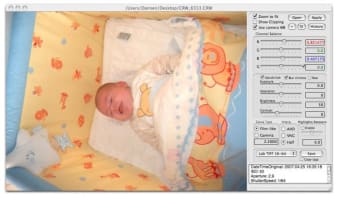
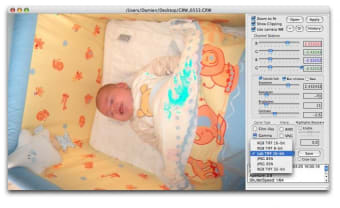
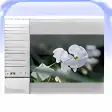
Now you can have this lab on your own Mac. Download Raw Photo Processor and you'll be able to work on your RAW files directly, adjusting their brightness, contrast, color balance, exposition, saturation, interpolation and other values. The whole process is really easy: simply move the slides with your mouse until you achieve the desired result, which the program shows in real time.

The only drawback to Raw Photo Processor is that it doesn't import RAW images from your camera, so you'll need to do that on your own before optimizing them with this program.

Raw Photo Processor enables you to work directly on your RAW files and easily optimize them before saving them to their final format.

Languages:

English

Recent changes in Raw Photo Processor:

  • Added gamut viewer for current image and specified color spaces. Use it to check if your processed image fits into final output device gamut like printer or monitor. See the documentation for more details (chapter Gamut View).
  • All new color profile for Sony A700 DSLR.
  • Adjusted internal defaults for many camera profiles.
  • Improved "Copy tags" option - now it creates EXIF tags for shutter speed, aperture, ISO, lens and original time stamp. Also it copies entire Maker Notes section from Raw files - some applications can recognize it and show a lot of internal details (exiftool f.e.) Also a lot of data stored as XMP block in the same file.
  • Fixed few bugs in batch mode.
  • Refreshed UI

OS requirements for Raw Photo Processor:

  • OS: Mac OS X

Minimum requirements:

  • Mac OS X 10.4 or higher
Pros
  • Very easy to use
  • Support for most RAW formats
Cons
  • It doesn't import RAW files
Did you like this review?
5 of 11 users liked it (45%)

From the publisher of Raw Photo Processor

A Raw converter for Mac OS X, supporting almost all available digital Raw formats made for photographers by a photographer-software engineer with unmeasurable amount of help and tutoring from my friend, professional photographer Iliah Borg.

Think of RPP as of a development machine in terms of film photography - first you have to develop your roll right, then do whatever you want with it. So this is NOT a full featured photo processing package, you will need Photoshop or some other tool to apply sharpness, cropping and so on, but you may use RPP for some carefully chosen operations:


4-channel white balance

This is probably the most important operation in Raw processing and it has to be applied at very early stages. RPP supports various ways of working with white balance - automatic detection, “as shot” (taken from camera), custom white balance from neutral areas and color tone adjustments on “cold - warm” scale.

Exposure compensation

Another very sensitive step, should use high precision math to preserve shadows and highlights and it is almost impossible to make it properly during post-processing in Photoshop.

Saturation

Very tricky operation, because it has to account for specifics in human's color perception and traditionally it's implemented with very crude methods. I'm trying to keep up with Color Science and using a lot more sophisticated approach.

Brightness and contrast

These represent my and Iliah's Borg attempts to create tone curve adjustments based on actual film density measurements in different development modes. After all you finally should be able to obtain that dearly-looking film-like tonality in your pictures.

Interpolation

RPP supports 3 methods at the moment. AHD, VNG and Half - all modified versions of Dave Coffin's implementations in dcraw. Actually Half is not interpolation - this is a half resolution recombination when four single-colored pixels (RGBG) combined to one RGB, very fast, color accurate, but at price of lost resolution.

Raw Photo Processor options

Raw Photo Processor Options

Reviews for Raw Photo Processor in other languages

Softonic Rating:Good
10/10

User Rating

1 rating
Usability
  • Currently 7/10.
Stability
  • Currently 10/10.
Installation
  • Currently 10/10.
Functionality
  • Currently 10/10.
Appearance
  • Currently 7/10.

Download stats

Related

Related searches